

Reserve Equipment
RENTING EQUIPMENT/STUDIOS
CREATING A CHEQROOM ACCOUNT
To reserve equipment, you must claim your account in Cheqroom. To do so, you must log into the website using the SSO option. You will be redirected to log in through your Buff Portal.
Once your account is created, email the Kage your class schedule so we can update your account for what equipment is available to you. This process can take 24-48 hours from your initial log in, or longer if it's the beginning of the semester. The Kage suggests logging into Cheqroom within the first week of classes.
Making a Reservation
All equipment must be reserved 12-hours in advance from your pick up time. If a student is unable to do so, they will be redirected to walk-in hours, or will be advised to make another order for the following day.
To reserve equipment, please follow the video below:
Once equipment is reserved, you'll receive an email confirmation. If you do not receive this confirmation, double check that you clicked "reserve" in cheqroom. Within 48hrs of your pick up time, a Kager will review your order and send order summary to your email. Please review your order summary carefully to ensure you have all the information you need to pick up.
Late Pick Ups & Cancellations
If you are late by 1-hour or more to pick up your equipment, your reservation will be canceled and you will be asked to make a reservation for the next day. The Kage will stage a order for pick up the day before. If you need to cancel, please notify us ASAP so we can adjust accordingly.
Picking Up & Checking Over Your Equipment
When you arrive to pick up, a Kager will point out any issues/quirks about your equipment. They will confirm if any of this is a hinder to your set, and will do their best to accommodate any issues.
You equipment is checked and pulled prior to your arrival. However, things happen. The Kage is run almost entirely by students who are learning like everyone else. Please check your equipment before leaving campus and report any problems ASAP. This will allow the Kage to resolve any issues with your order, or at the very least have a record in the system so you're not charged extra fees when returning.
We do not expect students to be experts on what is in our kits. So we've provided a variety of resources for students to use when checking their equipment: Information Tabs in Cheqroom, Kit Photos and Order Summaries.
Most items will have Kit Photos. These are pictures students can reference to see what is in a kit and how the kit is organized. Below is an example for a Canon C200 Kit:
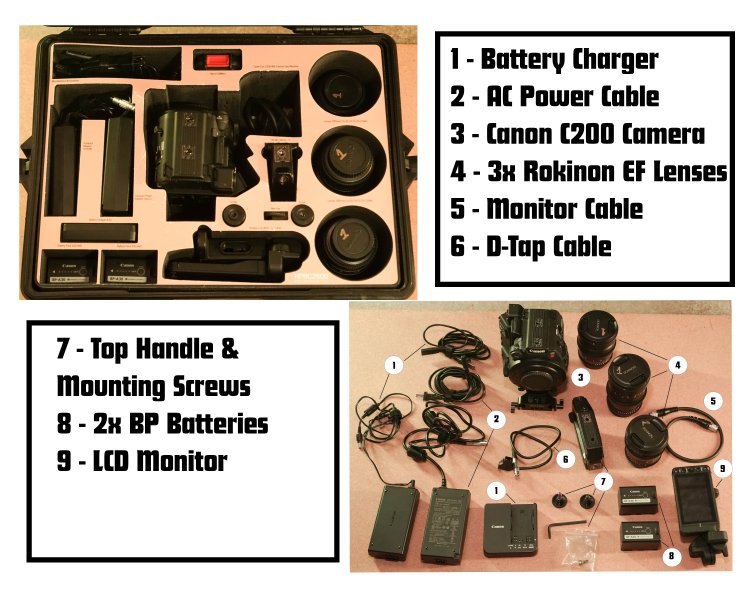
Order Summaries are PDFs attached to a student's order prior to their pick up that shows every item on their reservation, if there's any issues with and where to pick up equipment. Students can use this to check at a glance if they're run into any issues with the state of their gear, and make requests prior to their check out to make substitutions or adjustments.
Reserving Studios/Computer Labs
The Kage oversees a handful of labs and studios that are available for students to use. To reserve these spaces, students must fill out a Location Release form prior to making a reservation. Use of these rooms come at no additional cost to the student, and can be reserved at all hours of the day, provided classes are not scheduled. Students will gain direct ID access to buildings/rooms they've reserved via their BuffOne Card. Since access is not immediate, it's recommended that students reserve rooms during the week so the Kage has the ability to give them access before their scheduled time.
Each room may have a different process for reserve/use. Most rooms can be requested via Cheqroom, but there are a handful that students will need to email about if they'd like a reservation. Below shows how to reserve each room CINE oversees:
| BUILDING & ROOM # | Lab/Studio | How to Reserve |
|---|---|---|
| ATLAS 310 | Main Computer Lab | Walk-In (No Reservation Needed) |
| ATLAS 310 | Color Correction Suite | Reserve in Cheqroom (Training Required) |
| ATLAS 310 | Legacy Suite | Reserve in Cheqroom (Training Required) |
| ATLAS 342 | Overflow Lab | Walk-In (No Reservation Needed) |
| ATLAS 306 | Audio Suite | Reserve in Cheqroom (Training Required) |
| MACKY 2B27 | Grey Box Studio | Reserve in Cheqroom |
| MACKY 1B09 | Analog & Media Preservation Center | Email thekage@colorado.edu |
| MACKY 1B02L | Animation Lab | Walk-In (No Reservation Needed) |
| MACKY 1B05 | Moving Image Arts Darkroom | Only available to CINE Graduate Students and undergraduates enrolled in Analog Alternatives, or Advanced Analog Alchemy. |